We Measured the Complete Map of Claude Code Project Structure Against Our Own Repo
 An abstract representation of Claude Code project structure, showing how rules, skills, agents, and memory branch outward from a single project brain.
Overview
Anyone who has worked with Claude Code for a while knows the feeling: the .claude folder quietly turns into a junk drawer. Content that belongs in rules ends up in CLAUDE.md. Specialized knowledge that is only needed occasionally gets hard-coded into always-loaded rules. Personal environment paths bleed into team-shared files. Once the boundaries blur around what each component is supposed to hold, you end up paying token costs every session for context that has nothing to do with the current task.
In June 2026, a post titled “Claude Code Project Structure: The Complete Map” by Prakash Bhandari started circulating among developers. It maps five subsystems that the .claude folder controls – instructions (CLAUDE.md and rules), workflows (skills and commands), specialists (agents), permissions (settings.json), and memory – into a single coherent diagram. Since ThakiCloud already runs hundreds of skills and dozens of agents on top of this structure, we did not stop at reading the article. We held our actual repo up against the map to see how well they matched.
This post is a record of that comparison. We cover the role boundary of each component, the measured component counts from our ai-platform-strategy repo, and why this structure matters beyond mere tidiness when you are operating a Kubernetes-based AI/ML SaaS platform.
What Claude Code Project Structure Actually Is
The core idea is straightforward. Claude Code reads configuration from two locations: the project directory’s .claude folder, and the home directory’s ~/.claude. Project files are committed to git and shared across the team; home directory files apply globally to every project as personal configuration. Every component finds its place relative to these two roots.
The real value of the map is the answer to one question: when does each component get loaded into context? Some things arrive automatically at the start of every session. Others only arrive when a specific request triggers them. That timing difference is a token cost difference, which means deciding where to put something is not a matter of preference – it is an operational cost decision.
flowchart TB
    ROOT["Project Root"]
    ROOT --> BRAIN["CLAUDE.md<br/>Project Brain<br/>(auto-loaded every session)"]
    ROOT --> LOCAL["CLAUDE.local.md<br/>Personal Override<br/>(gitignore)"]
    ROOT --> IGNORE[".claudeignore<br/>Context Boundary"]
    ROOT --> MCP[".mcp.json<br/>External Tool Connections"]
    ROOT --> DOTC[".claude/"]
    DOTC --> SET["settings.json<br/>Permissions · Hooks · Env Vars"]
    DOTC --> RULES["rules/<br/>Always-on Constraints<br/>(loaded every turn)"]
    DOTC --> SKILLS["skills/<br/>On-demand Expertise<br/>(loaded on request)"]
    DOTC --> AGENTS["agents/<br/>Subagent Definitions"]
    DOTC --> MEM["agent-memory/<br/>Knowledge Learned by Agents"]
    DOTC --> WT["worktrees/<br/>Parallel Isolation"]
Claude Code project components organized by load timing. Click to enlarge.
Role Boundaries for Each Component
Where the map earns its keep is in defining what belongs where. Here is how each component’s responsibility maps to how we actually run things.
CLAUDE.md is the project brain. It loads automatically every session and serves as the standing brief shared across the entire team. Think of it as the onboarding document you hand a new contractor on day one. What are we building, what stack does it run on, what conventions do we follow, what are the workflow rules. The principle is to answer exactly those four questions and nothing else. Every line pays rent. A bloated CLAUDE.md is wasted context.
CLAUDE.local.md is personal override. Same format, but it never goes into git. Local environment paths, debugging shortcuts, personal preferences, anything specific to your machine lives here. Team members can have completely different versions, and that is the point – it keeps the shared CLAUDE.md clean.
.claudeignore is the context boundary. It uses the same syntax as .gitignore and limits what Claude can read. Without it, node_modules, generated migrations, vendor dependencies, and large fixtures consume your context budget. On a large monorepo it is practically mandatory.
rules are always-on constraints. They load automatically on every turn, so only genuinely invariant rules belong here – the things that apply to every task in every session. If you put a 200-line architecture document into a rules file, that content consumes context even in sessions where it is completely irrelevant. Documents should stay dormant until a skill explicitly reads them.
skills are on-demand expertise. They load only when a request triggers them. Specialized workflows that are not always needed, domain-specific pipelines, repeatable task recipes – these belong in skills. The dividing line between CLAUDE.md and skills is the phrase “only sometimes needed.”
agents are subagent definitions. Each agent is a specialist with its own role, tool set, and model tier, summoned when needed. The routing logic assigns cheaper models to exploration, balanced models to implementation, and the most capable models to architecture decisions.
agent-memory is what agents have learned. This is where agent-memory and CLAUDE.md fundamentally differ. CLAUDE.md holds what a person explicitly told the system. Agent-memory holds what an agent accumulated through experience – repeated patterns, bugs, undocumented conventions that a long-running agent has encountered.
Deciding Where New Knowledge Goes
You can have the map memorized and still hesitate when it is time to add a new rule or workflow. The placement decision tree from the article simplifies that judgment.
flowchart TB
    START["Adding New Knowledge · Rule · Workflow"]
    START --> Q1{"Always applied +<br/>shared across team?"}
    Q1 -->|Yes| CMD["CLAUDE.md (concise)<br/>or .claude/rules/"]
    Q1 -->|No| Q2{"Occasional specialized<br/>workflow?"}
    Q2 -->|Yes| SK[".claude/skills/"]
    Q2 -->|No| Q3{"Independent role ·<br/>tool combination?"}
    Q3 -->|Yes| AG[".claude/agents/"]
    Q3 -->|No| Q4{"Personal environment<br/>specifics?"}
    Q4 -->|Yes| LO["CLAUDE.local.md<br/>(gitignore)"]
    Q4 -->|No| Q5{"Something an agent<br/>learned through experience?"}
    Q5 -->|Yes| ME[".claude/agent-memory/"]
    Q5 -->|No| PL["plugins/<br/>(deploy across multiple projects)"]
Placement decision tree for new knowledge. The questions run in order: is this always needed, is it occasional expertise, does it define an independent role, is it personal, or is it something an agent learned?
The most common mistakes are equally clear. Dumping “only sometimes needed” knowledge into CLAUDE.md wastes tokens every session. A monorepo without .claudeignore bleeds context. Committing CLAUDE.local.md to git exposes personal information and local paths. Keeping more than ten MCP servers active at once burns roughly 10,000 tokens per session whether you use those servers or not.
Measuring the ThakiCloud Repo Against the Map
With the map in hand, we measured the .claude directory of our ai-platform-strategy repo directly.
| Component | Measured | Load timing |
|---|---|---|
| CLAUDE.md | 94 lines | every session, auto |
| .claude/rules | 40 files | every turn, auto |
| .claude/skills | 1,655 directories | on-demand |
| .claude/agents | 54 definitions | on summon |
| .claude/hooks | 15 files | on event |
| .claudeignore | present (442 bytes) | always-on boundary |
| .mcp.json | present (166 bytes) | on server connect |
| .claude/settings.json | present (5 KB) | every session |
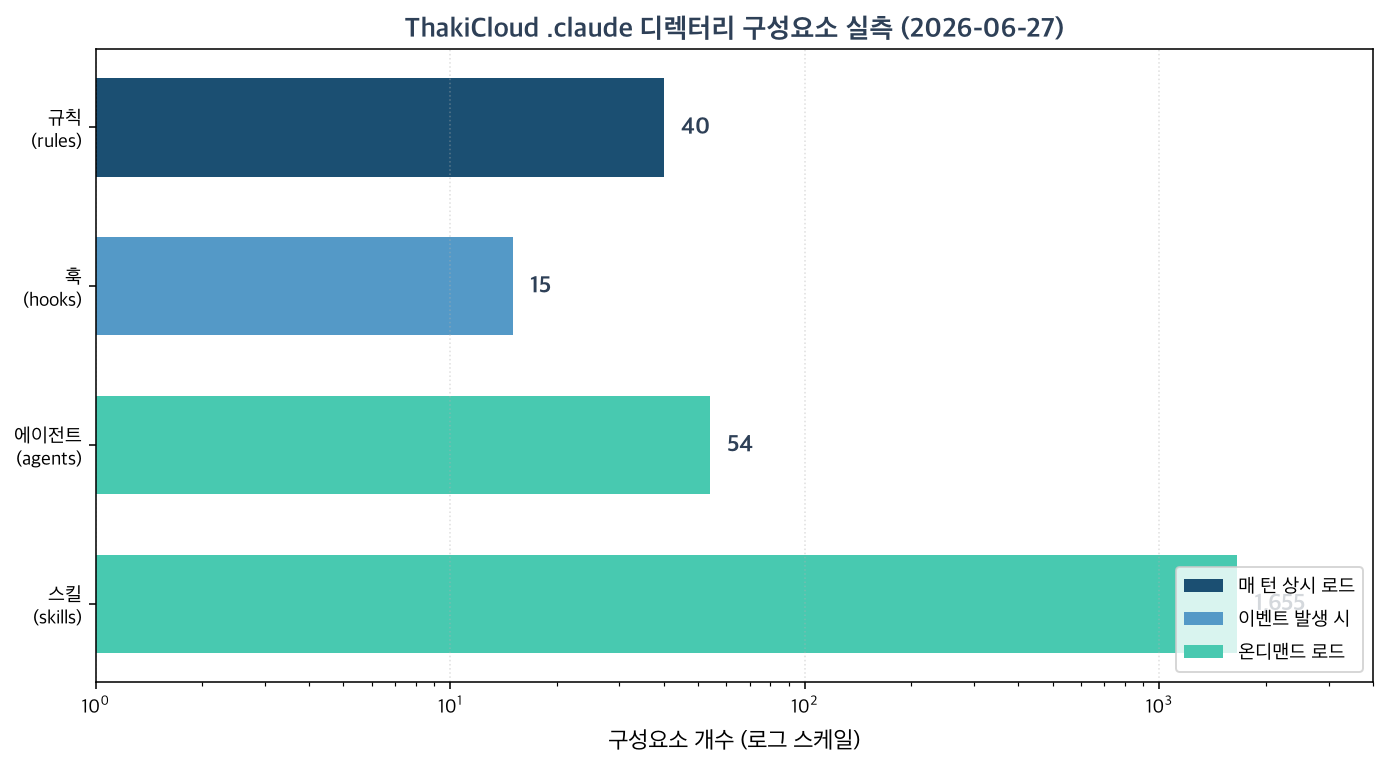 The 40 rules and 94-line CLAUDE.md are fixed overhead that arrives every turn. The 1,655 skills and 54 agents are on-demand assets that only appear when needed.
These numbers prove the map’s central point. If all 1,655 skills had been packed into CLAUDE.md or rules files, the context limit would blow on the very first session. In practice, those 1,655 skills load on-demand only, and a separate router narrows the candidate set on every turn before any skill is loaded. The always-on side of the ledger – rules – is intentionally kept at 40 files. That number is the result of a hygiene rule: keep each rules file under 2 KB, and demote anything larger to a skill.
One detail worth noting: after reading the source article, we immediately distilled it into a rules file named claude-code-project-anatomy.md and committed it to the repo. In other words, “the project structure map” itself passed through the placement decision tree once and ended up as an always-on rule that is referenced every turn. The map placed itself on the map.
What This Means for ThakiCloud’s Products
The SKILL.md registry, subagent definitions, and rules structure in Claude Code map directly onto the design principles of Paxis, ThakiCloud’s Agent-Native Cloud currently in PoC. Paxis runs a Skill Harness that selects from 960-plus skills using BM25 retrieval and executes them in isolated sandboxes – a production-grade generalization of exactly the on-demand skill pattern this post describes. The principle “keep always-on rules minimal, put specialized workflows into on-demand skills” is the same principle Paxis uses to treat skills as first-class resources. The thin harness, fat skills discipline is the architectural foundation of the Paxis agent registry.
Paxis takes this structure from a single-developer environment and scales it to a production runtime. It manages Skills, Tools, Policies, and Audit Logs as first-class resources, and implements an agent control plane through DAG multi-agent orchestration, natural-language Cron, and MCP connectors. The self-evolving skills and policy gate features are a product-level elevation of the idea Claude Code expresses through agent-memory: separating the channel where agents accumulate learned knowledge from the channel where administrators review and approve it. This post’s lessons about context boundaries and on-demand routing are the practical grounding for Paxis design decisions.
The LLM endpoints that power this Skill Harness at inference time are supplied by ai-platform, ThakiCloud’s Kubernetes-based AI/ML infrastructure layer running vLLM multi-tenant model serving and Kueue GPU scheduling – the execution substrate that receives and processes Paxis agent inference requests.
Caveats and Counterarguments
This map is not a complete solution. A few honest limitations.
First, component boundaries are recommendations, not enforcement. Claude Code itself will not stop you from putting skill-level content into a rules file. Maintaining the boundaries requires team discipline, and in our case it requires token hygiene rules and router gates in code. Reading the map and expecting things to stay organized by themselves does not work.
Second, 1,655 skills is not a number to brag about – it cuts both ways. More candidates mean more noise risk: the router has more opportunities to surface the wrong skill. On-demand loading avoids always-on token cost, but retrieval accuracy becomes a different kind of cost. “On-demand means free” is too simple a conclusion.
Third, this structure is specific to Claude Code. Moving to a different agent execution environment changes the directory conventions and the load mechanism. That is why knowledge should be written as environment-agnostic as possible, with only the environment-specific wiring kept thin.
Finally, some figures in the source article – such as roughly 1,000 tokens per MCP server – are approximations that vary with environment and version. Rather than treating them as absolutes, the right takeaway is the direction: anything that loads every turn has a cost, and that cost compounds.
Sources
- Claude Code Project Structure Explained: The Complete 2026 Guide (Prakash Bhandari)
- Explore the .claude directory (Claude Code official documentation)
- Measured against: ThakiCloud
ai-platform-strategyrepo.claudedirectory (measured 2026-06-27)