Document Parsing SOTA at 0.9B: We Ran PaddleOCR-VL on Korean and Arabic Documents
 An abstract representation of many documents being organized into structured data.
📄 Full deep review (DOCX): Download the detailed peer review on Google Drive.
Overview
Document parsing – converting documents into machine-readable structure – has regained importance in the era of RAG and AI agents. A single PDF page can mix body text, tables, formulas, charts, and multi-column layouts, and untangling all of that in the correct reading order is a prerequisite for LLMs to reason over it effectively. Until now, this space has been dominated by large multimodal models like GPT-4o or Gemini 2.5 Pro, or by heavy pipeline-based tools.
PaddleOCR-VL, released by the PaddlePaddle team at Baidu, challenges that picture. Its core model, PaddleOCR-VL-0.9B, has roughly 960 million parameters – an ultra-compact vision-language model – yet it reports top-tier performance on both page-level document parsing and element-level recognition. The license is Apache-2.0, meaning unrestricted commercial use, and the model has already accumulated over 120,000 downloads on Hugging Face.
At ThakiCloud, we operate multi-tenant inference and document processing workloads directly on our Kubernetes-based AI/ML SaaS platform. So instead of just summarizing the paper, we installed the model ourselves and ran inference on documents mixing Korean, English, and Arabic. The goal: find out whether a small model is genuinely usable in practice and where it fits in our platform.
What This Technology Is
The core design philosophy of PaddleOCR-VL is: do not handle everything with a single large end-to-end VLM. End-to-end approaches rely on long autoregressive decoding, which is costly in latency and memory, and they are prone to hallucinations and instability on multi-column or mixed layouts. PaddleOCR-VL separates the work into two stages instead.
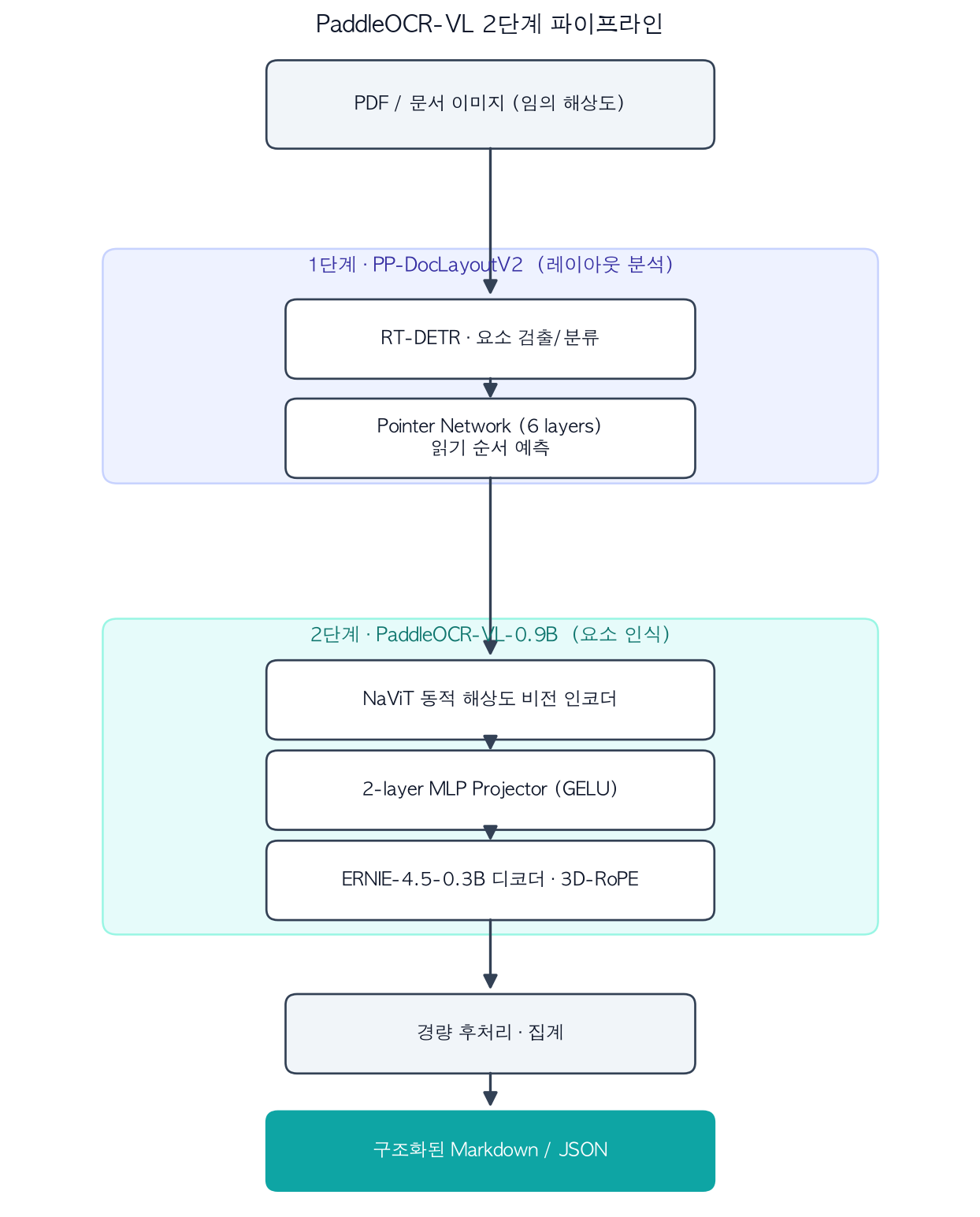 Two-stage structure separating layout analysis from element recognition.
Stage 1, Layout Analysis (PP-DocLayoutV2): A lightweight dedicated model locates and classifies semantic regions in the document, then predicts reading order. It uses RT-DETR for object detection and a pointer network with 6 transformer layers for reading order prediction. By offloading layout reasoning from the heavy VLM into a separate module, the pipeline achieves stable results even on complex multi-column layouts.
Stage 2, Element Recognition (PaddleOCR-VL-0.9B): This stage receives the regions identified in Stage 1 and performs fine-grained recognition of body text, tables, formulas, and charts. The architecture follows the LLaVA family, but uses a NaViT-style dynamic-resolution encoder (initialized from the Keye-VL vision model) as its visual backbone, enabling lossless processing of arbitrary-resolution images. A 2-layer MLP projector with GELU activation (merge size 2) bridges visual features into the language model’s embedding space, and the decoder is ERNIE-4.5-0.3B with 3D-RoPE. Choosing a small language model as the decoder is a deliberate speed tradeoff – smaller decoders decode faster per token.
A lightweight post-processing module then merges the outputs of both stages into structured Markdown and JSON. The model supports 109 languages, covering not only Latin scripts but also Korean, Japanese, Arabic, Cyrillic, Devanagari (Hindi), and other writing systems.
Installation and Integration
Let’s walk through the installation. Our environment is an Apple Silicon MacBook (macOS, CPU-only, no GPU acceleration) running Python 3.12.8. PaddleOCR-VL runs on top of the PaddlePaddle ecosystem, so we install two packages:
# Install into the shared virtual environment (.venv) per python-runtime rules
VIRTUAL_ENV="$PWD/.venv" uv pip install paddlepaddle paddleocr
# Installed versions: paddlepaddle==3.3.1, paddleocr==3.7.0
The first inference attempt raised this error:
RuntimeError: A dependency error occurred during pipeline creation.
Please refer to the installation documentation to ensure all required dependencies are installed.
The PaddleOCR-VL pipeline requires additional document-parsing-specific dependencies. One extra command resolved it:
VIRTUAL_ENV="$PWD/.venv" uv pip install "paddleocr[doc-parser]"
The inference code itself is short. The pipeline downloads the required models automatically on first use:
from paddleocr import PaddleOCRVL

pipe = PaddleOCRVL()                 # Downloads models automatically on first call
out = pipe.predict("sample_doc.png") # Document image -> structured output
for res in out:
    res.save_to_markdown(save_path="paddleocr_out")
One important note: paddleocr==3.7.0 automatically selects PP-DocLayoutV3 as the layout model and PaddleOCR-VL-1.6-0.9B as the recognition model when building the pipeline. In other words, the package pulls in the post-publication 1.6 model and a newer layout model as its defaults – not the original version from the base paper (2510.14528). The widely shared “OmniDocBench 96.33% SOTA” figure comes from PaddleOCR-VL-1.6 (on OmniDocBench v1.6), and the version is different from the numbers reported in the original paper. We will clarify this distinction in a later section.
Actual Experiment Results
For our test document, we created a synthetic image mixing Korean, English, Arabic, numbers, and simple formulas – a single-page document modeled after a ThakiCloud invoice and cost report. The actual timings measured in a CPU-only environment:
- Model initialization (first call, including download): 74.7s
- Inference (predict): 32.65s / page
- Total elapsed (import to save): 137.4s
- Decoder architecture log: GQA (grouped-query attention), num_heads 16 / num_key_value_heads 2
The recognized Markdown output was as follows:
## ThakiCloud Document Intelligence
Kubernetes AI/ML SaaS Platform - Invoice No. 2026-0623
타키클라우드 멀티테넌트 추론 비용 보고서
GPU hours: 1,284 Total: $9,640.00
E = mc^2 sum_{i=1}^{n} x_i
Notable observations: the model captured the English heading as a Markdown heading (##), correctly recognized the Korean sentence “타키클라우드 멀티테넌트 추론 비용 보고서” verbatim, and read the numeric and currency values ($9,640.00, GPU hours 1,284) without error. Korean recognition quality was surprisingly stable for a 0.9B model.
One finding worth reporting honestly: the Arabic line in our synthetic image was classified as an image region rather than transcribed as text. This appears to be an issue with our test image rather than a model defect. When rendering Arabic with PIL, character joining (shaping) and bidirectional (bidi) text handling were not applied correctly, causing the characters to render in an unconnected form. The layout stage likely interpreted this as a graphic. The Arabic line-level edit distance reported in the paper is 0.122, which is low enough to suggest that real Arabic documents would yield very different results. The experience itself is an operational lesson: preprocessing and rendering quality drive outcomes.
Let us also look at the benchmark numbers the paper reports on public datasets. The chart below shows per-language line-level text recognition edit distances reported in the base paper (arXiv:2510.14528) for a subset of the 109 supported languages (lower is better).
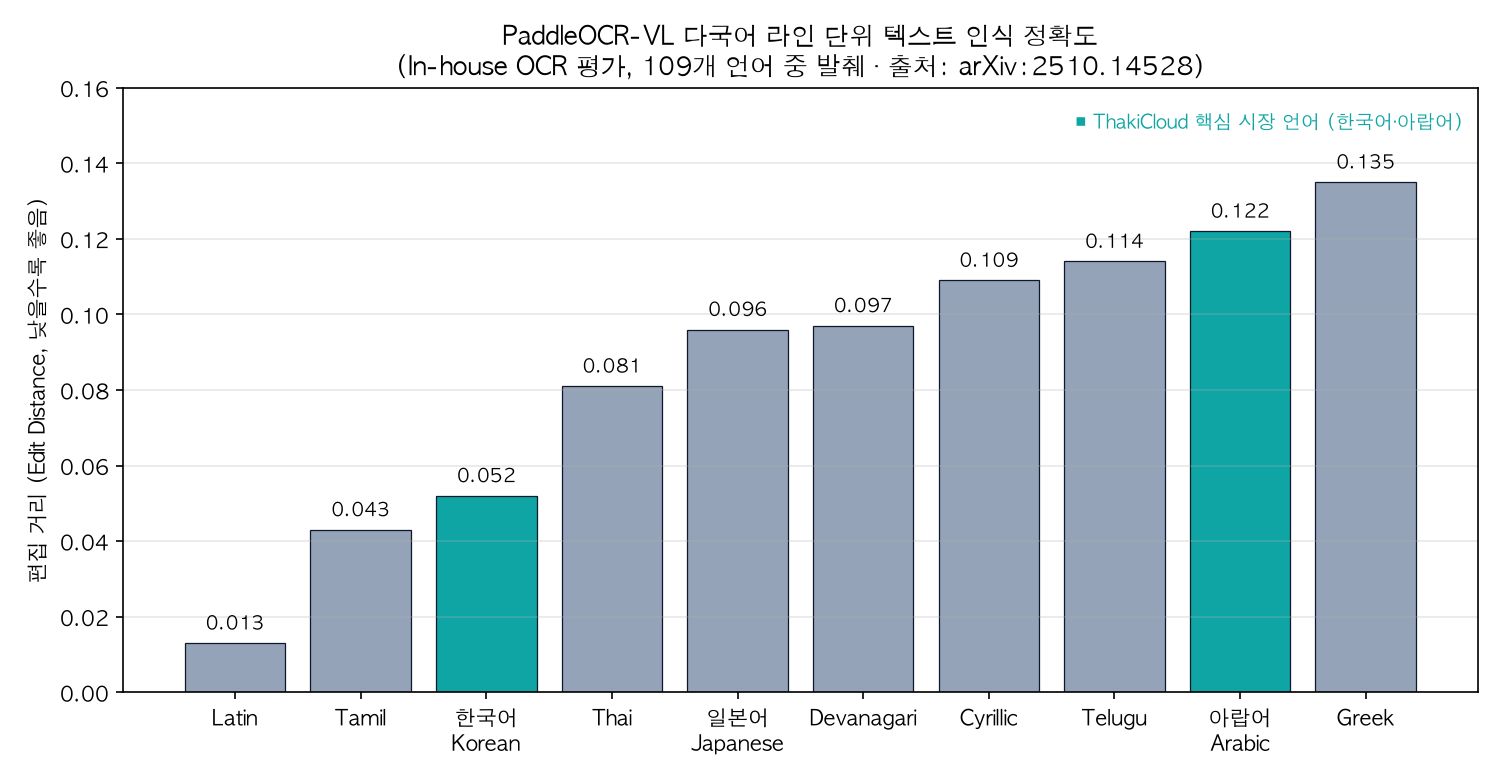 Korean and Arabic highlighted as ThakiCloud’s core market languages. Source: arXiv:2510.14528.
Korean achieves 0.052 and Arabic achieves 0.122 – solid edit distances for both languages ThakiCloud targets. At the page level, the base paper reports an OmniDocBench v1.5 aggregate score of 92.86, ahead of the next-best MinerU2.5-1.2B (90.67).
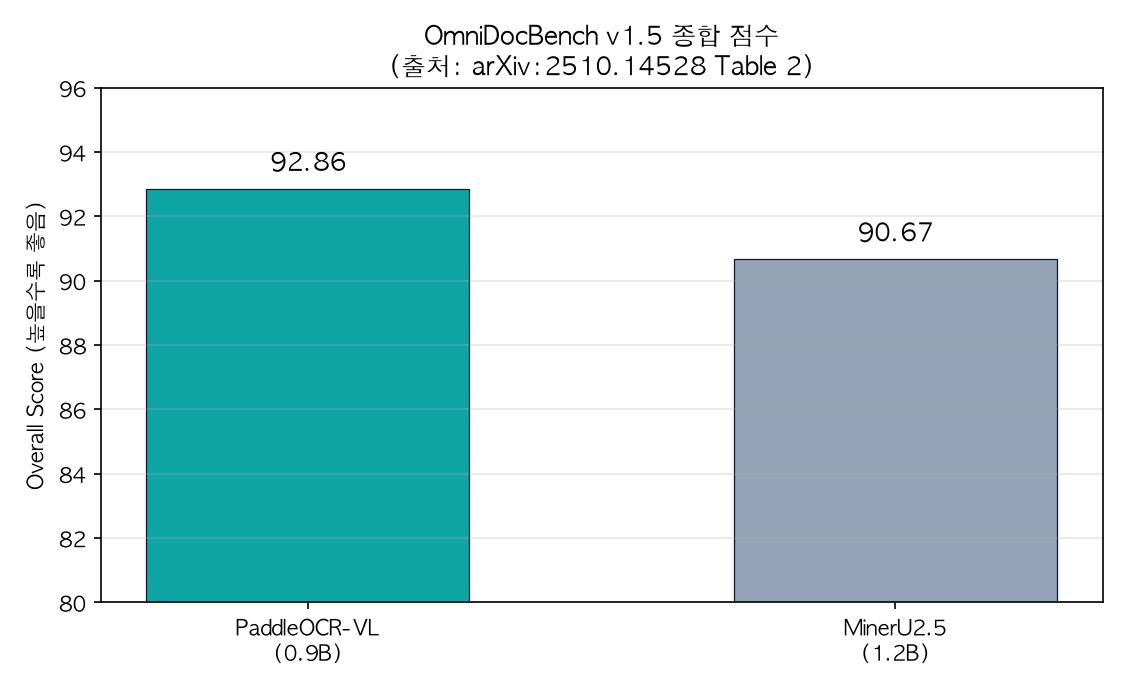 A 0.9B model beating a 1.2B model on aggregate score. Source: arXiv:2510.14528 Table 2.
When citing these numbers, version clarity matters. The base paper (2510.14528) reports 92.86 on OmniDocBench v1.5. The subsequent release PaddleOCR-VL-1.5 reports 94.5% on v1.5, and PaddleOCR-VL-1.6 reports 96.33% on v1.6 as an [estimated] figure (based on a separate report for the later version). The 96.33% seen on social media is the score from the latest 1.6 release. It is also worth keeping in mind that the inference throughput figures in the paper were measured on a single NVIDIA A100 with batch sizes of 512 PDFs and high-performance serving engines like vLLM, SGLang, and FastDeploy. Our CPU-measured 32.65s per page is a reference point for an unaccelerated environment – not a production throughput figure.
Implications for ThakiCloud K8s AI/ML SaaS Platform
What makes this model interesting is not just the high benchmark scores – it is the fact that it is small enough to operate easily. From ThakiCloud’s stack perspective:
- Low-cost multi-tenant serving: A 0.9B model fits on a single consumer-grade or entry-level GPU. Deployed on top of our Kueue-based GPU scheduling and vLLM/SGLang serving infrastructure, we can run per-tenant document parsing endpoints at a reasonable cost – controlling unit economics through self-hosted inference instead of paying per-token fees to a large VLM API every time.
- Data sovereignty and on-premise deployment: Documents often contain information that cannot be sent outside – invoices, contracts, medical records, financial data. With an Apache-2.0 model hosted on-premise, we can deliver document intelligence without routing sensitive data through external APIs. This also aligns with network isolation and data-export restrictions common in Korean public-sector and financial environments.
- Multilingual coverage as market fit: Our blog publishes in Korean, English, and Arabic simultaneously. With our eyes on both the Korean and Middle Eastern markets, having a single model that reliably handles Korean (0.052) and Arabic (0.122) is directly a product advantage – it reduces the need to bolt on different OCR engines per market.
- Document parsing as the input layer for RAG: Structured Markdown and JSON output feeds directly into RAG indexing and agent tool calls. Text that preserves layout and reading order produces higher-quality chunks, which directly improves retrieval accuracy.
At a more mature deployment stage, the two-stage design also opens the door to heterogeneous scheduling: run the layout stage on CPU nodes and the VLM recognition stage on GPU nodes as separate services. The explicit separation of the two stages is actually an advantage for resource allocation in a Kubernetes environment.
Limitations and Counter-Arguments
The strengths are real, but so are the weaknesses. Based on our measurements and the literature:
- CPU inference is slow: Our measured 32.65s per page is not suitable for bulk document processing. In production, a GPU and a serving engine like vLLM or SGLang are effectively mandatory – the impressive throughput numbers in the paper come from an A100 batch environment.
- Two-stage dependency management: You now have two models to manage together – the layout model and the recognition model. Deployment and version compatibility overhead is higher than with a single model. In practice, the package already defaults to PP-DocLayoutV3 + PaddleOCR-VL-1.6, and the default combination may change over time.
- SOTA numbers are version-specific: 96.33% is the score of version 1.6 on OmniDocBench v1.6, not the headline of the original 0.9B paper. Citing this figure without specifying the version and benchmark edition will cause confusion.
- Input quality dependency: As our Arabic test showed, the rendering quality, resolution, and character shaping of the input image drive results. In a real data pipeline, the input normalization stage matters as much as model selection.
- Reported weakness in table recognition: The base paper itself notes that English table TEDS on OmniDocBench v1.0 (88.0) is relatively low (with an explanation about annotation errors), so documents heavy in tables warrant additional validation.
On balance, PaddleOCR-VL is a compelling choice for self-hosted document intelligence as a compact but capable document parsing model. To realize its full value in production, however, three operational challenges must be addressed together: GPU serving, version pinning, and input preprocessing.
Sources
- PaddleOCR-VL paper (arXiv:2510.14528): Boosting Multilingual Document Parsing via a 0.9B Ultra-Compact Vision-Language Model
- Hugging Face model card: PaddlePaddle/PaddleOCR-VL
- Source code: github.com/PaddlePaddle/PaddleOCR
- The experiments in this post were conducted directly in the ThakiCloud environment (macOS, CPU). Benchmark figures cited are as reported in the paper above.
📄 Full deep review (DOCX): Download the detailed peer review on Google Drive.